One of the development principle is to separate UI (User Interface, refer to web pages) and backend to different applications. The reason being, first, UI and backend API usually are sitting in different zones. UI can be placed in web server normally sitting in DMZ zone, while backend API normally sits in intranet zone. Between them separated by firewall. This is obviously is because of security concern. UI has no access to database, MQ resources. It has to reply on backend API for retrieving data. Second, developer may have different focus. So UI developer can focus on UI without concerning backend logic. The bridge between UI and backend API, it’s the interface. If the interface between UI and backend is defined, UI development doesn’t depend on the progress of the backend API development. Since UI already know how the data going to be passed by backend API, I can mock the data when I’m doing the development. I can use the mock data to test my UI. When come to integration stage, everything is going to work since interface is the same.
For React application, we can use webpack server for development testing purpose. In package.json, you have the start script to start webpack server. webpack.config.js is the configuration script to configure webpack server.
  "scripts": {
    "build": "webpack --config webpack.config.js --env.NODE_ENV=prod --mode=production",
    "start": "webpack-dev-server --config webpack.config.js --env.NODE_ENV=dev --mode=development --open",
    "test": "react-scripts test",
    "eject": "react-scripts eject"
  },
In webpack server, there are two ways you can set up to retrieve data from backend. First, since you already know the interface, you can create mock data to mimic the data from backend. The framework we can use is connect-api-mocker.
const apiMocker = require('connect-api-mocker');

module.exports = (env) => {
  return {
    devServer: {
      ...
      after: function (app) {
        app.use('/api', apiMocker('mocks/api'));
        app.use('/apio', apiMocker('mocks/api'));
      },
      ...
Above example, after is life cycle, mean after all other configuration, if there is any. It will apply the connect-api-mocker middleware. In this case, if the context path is /api or /apio, it will route the request to folder mock/api. The mock folder structure is like below.
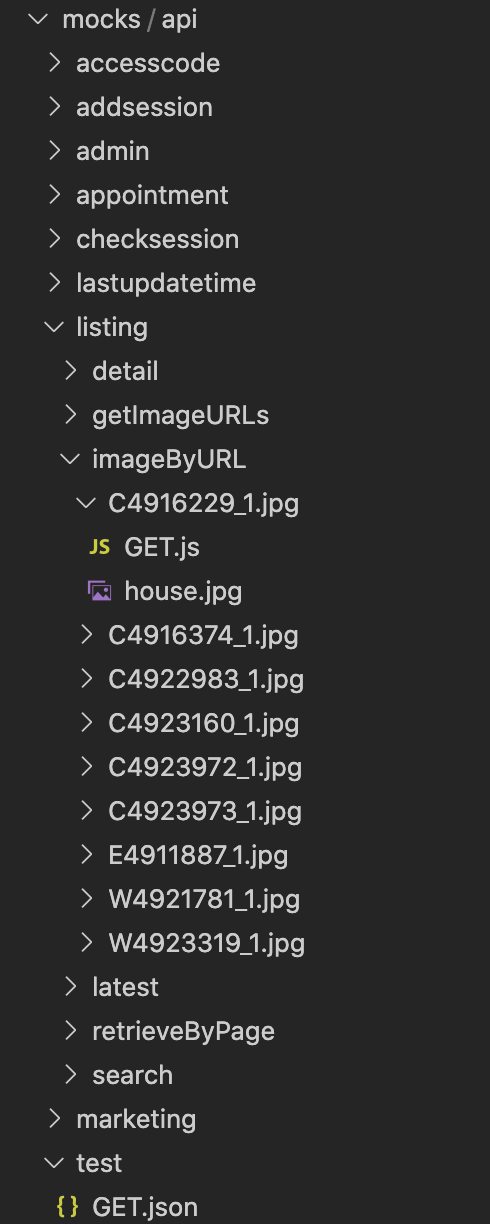
For handling GET /api/listing/imageByURL/C4916629_1.jpg, define the folder mock/api/listing/imageByURL/C4916629_1.jpg, create GET.js for handling the http GET. Below code is just returning an image back.
const fs = require('fs');
const path = require('path');

module.exports = (request, response) => {
  const filePath = path.join(__dirname, 'house.jpg');
  const stat = fs.statSync(filePath);

  response.writeHead(200, {
    'Content-Type': 'image/jpeg',
    'Content-Length': stat.size,
  });

  const readStream = fs.createReadStream(filePath);
  setTimeout(function () {
   readStream.pipe(response);
  }, 1000);
};
Second way, say some backend simulator can provide data, you can use proxy to route the request to backend.
    devServer: {

      ...

      after: function (app) {
        app.use('/api', apiMocker('mocks/api'));
        app.use('/apio', apiMocker('mocks/api'));
      },
      proxy: [
        {
          context: ['auth'],
          target: 'https://www.backend.net:3000',
          headers: {
            Accept: 'application/json',
            'Content-Type': 'application/json',
            Authorization: 'Basic bW9iaWxlOmFiY2RlZmdoaWpxxxxxxxxx',
          },
          changeOrigin: true,
          withCredentials: true,
        },
      ],
    },
So above code it tells, for context path /auth, route the request to https://www.backend.net:3000. You can provide headers, and some other switches for passing cookies and handling Cross-Origin Resource Sharing.
Happy coding..