Recently I made a small chatroom application to understand how REACT works with backend websocket. It’s pretty simple to implement.
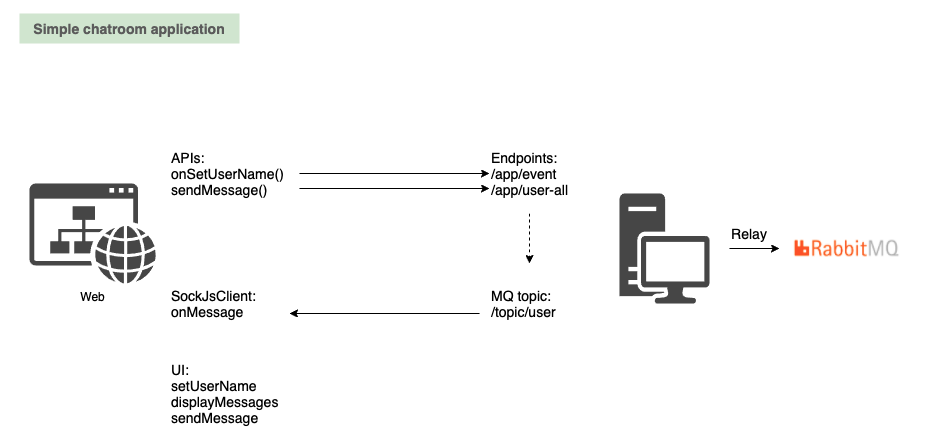
Below it’s the diagram. We have REACT UI on left side, Springboot as MQ broker side. You can either use springboot in memory as broker, or relay to RabbitMQ.
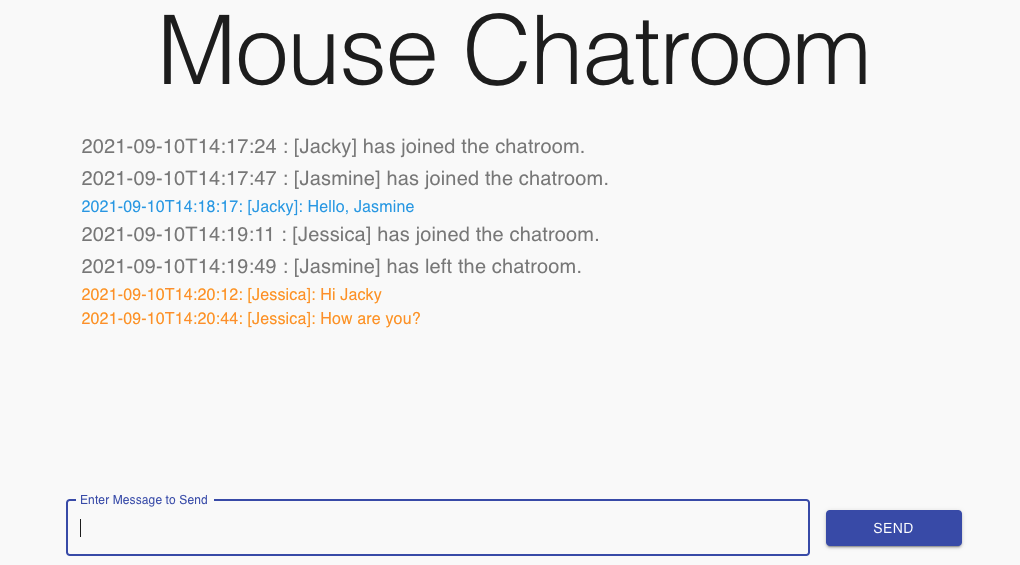
The chatroom is looked like below
Here is some highlights. First, backend configuration class we need to define the MQ broker config. Here we define stomp endpoint registry, the application prefix and relay to my backend RabbitMQ server. So ‘/websocket-chat’ will be the URL for socketJsClient to register itself.
@Configuration
@EnableWebSocketMessageBroker
public class WebSocketConfig implements WebSocketMessageBrokerConfigurer {
    @Override
    public void registerStompEndpoints(StompEndpointRegistry stompEndpointRegistry) {
        stompEndpointRegistry.addEndpoint("/websocket-chat").setAllowedOriginPatterns("*").withSockJS();
    }

    @Override
    public void configureMessageBroker(MessageBrokerRegistry registry) {
       // Use RabbitMQ as broker
        registry.setApplicationDestinationPrefixes("/app");
        registry.enableStompBrokerRelay("/topic").setRelayHost("192.168.0.12").setRelayPort(61613)
                .setClientLogin("guest").setClientPasscode("guest");
    }
}
Second, we define the message endpoints. We have two endpoints, one is event. This is to capture user login logout event. so other users know who logs in or logs out. For the login event, we also memorize the user name in the session. so when user disconnects, we can get the user name from session. Second one is /user-all, this is the endpoint for all users sending messages. As you see, after the endpoint receives messages, it sends to the topic. So whoever subscript the topic, he will get the message. So for UI frontend, use /app/user-all and /app/event, it’s able to broadcast messages.
@Controller
public class SocketController {
    private final Format formatter = new SimpleDateFormat("yyyy-MM-dd'T'HH:mm:ss");

    @MessageMapping("/user-all")
    @SendTo("/topic/user")
    public MessageBean sendToAll(@Payload MessageBean message) {
        message.setTimestamp(formatter.format(new Date()));

        return message;
    }

    @MessageMapping("/event")
    @SendTo("/topic/user")
    public MessageBean newUser(@Payload MessageBean webSocketChatMessage, SimpMessageHeaderAccessor headerAccessor) {
        headerAccessor.getSessionAttributes().put("username", webSocketChatMessage.getName());
        webSocketChatMessage.setTimestamp(formatter.format(new Date()));

        return webSocketChatMessage;
    }
}
Last on server side, we need to define a listener. So when user disconnects(Close browser), the application can be triggered and broadcast to the topic to notify the user is disconnected.
@Component
public class WebSocketChatEventListener {
    private final Format formatter = new SimpleDateFormat("yyyy-MM-dd'T'HH:mm:ss");

    @Autowired
    private SimpMessageSendingOperations messagingTemplate;

    @EventListener
    public void handleWebSocketConnectListener(SessionConnectedEvent event) {
        System.out.println("Received a new web socket connection");
    }

    @EventListener
    public void handleWebSocketDisconnectListener(SessionDisconnectEvent event) {
        StompHeaderAccessor headerAccessor = StompHeaderAccessor.wrap(event.getMessage());
        String username = (String) headerAccessor.getSessionAttributes().get("username");

        if (username != null) {
            MessageBean chatMessage = new MessageBean();
            chatMessage.setType("event-leave");
            chatMessage.setName(username);
            chatMessage.setTimestamp(formatter.format(new Date()));
            Gson gson = new Gson();

            messagingTemplate.convertAndSend("/topic/user", gson.toJson(chatMessage));
        }
    }
}
In frontend REACT, it’s easy to configure. We register the sockJsClient to url /websocket-chat. And listen to topic /topic/user. We define our handler when receiving an message. Also some other codes to handle user login and send message API call. Nginx config will handle proxy the relative path to the springboot backend.
       <SockJsClient
        url="/websocket-chat/"
        topics={['/topic/user']}
        onConnect={onConnect}
        onDisconnect={onDisconnect}
        onMessage={(msg) => {
          var wrkMessages = messages;
          wrkMessages.push(msg);
          setMessages([...wrkMessages]);
        }}
        ref={clientRef}
      />
Source code can be found in my github. Service side: https://github.com/jackyzsn/chatroom-backend. REACT side: https://github.com/jackyzsn/chatroom-front.